
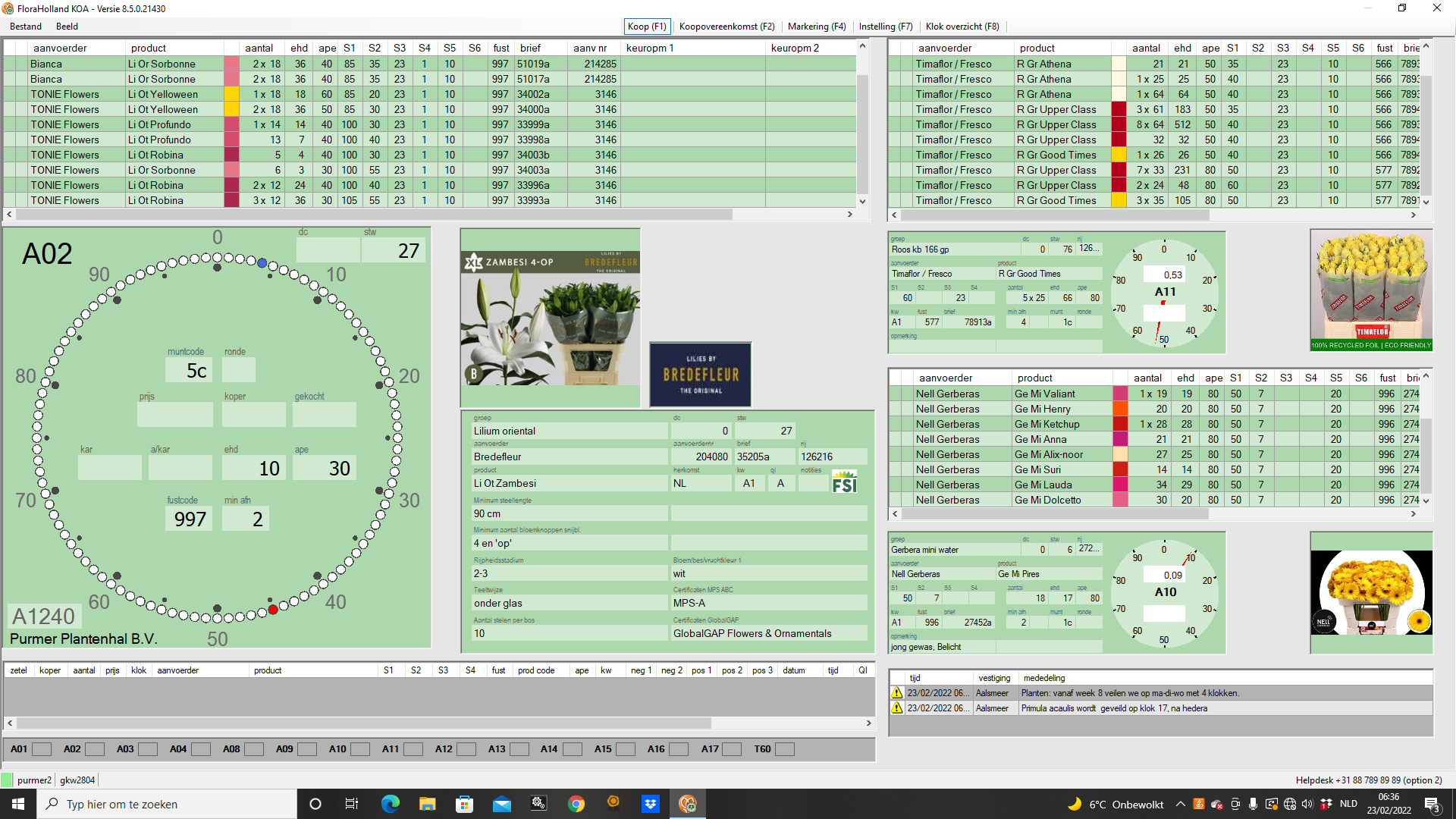
Wie kauft man Blumen auf der Floraholland-Auktion? (KOA)
KOA steht für Fernkauf, was bedeutet Fernkauf.
Mit KOA können Sie von Ihrem Computer aus an der Live-Auktion teilnehmen, egal wo auf der Welt Sie sich befinden.
Um KOA zu nutzen, benötigst du:
- a KOA-Lizenz
- a Computer mit installierter KOA-Software
- a USB-Headset
- a stabile Internetverbindung
Das Headset wird benötigt, da der Auktionator möglicherweise während der Auktion mit Ihnen kommunizieren muss.
Warum Internetstabilität wichtig ist
Beim Kauf auf der Auktion ist ein stabile Internetverbindung.
Sollte Ihre Verbindung unterbrochen werden, während der Countdown läuft, könnten Sie das Produkt verpassen, das Sie kaufen wollten.
Aus diesem Grund bevorzugen professionelle Einkäufer normalerweise einen kabelgebundene Internetverbindung anstelle von WLAN.
Wie die Auktion-Uhr funktioniert
Die Auktion beginnt normalerweise um 06:00 Uhr morgens.
Wenn die Uhr zu laufen beginnt, startet der Preis auf einem hohen Niveau und sinkt langsam.
Der Käufer, der zuerst seine Tastaturtaste drückt hält die Uhr an und kauft das Los.
Jede Taste auf deiner Tastatur repräsentiert eine bestimmte Menge.
Der Moment, in dem du die Uhr anhältst:
- Ihre Käufernummer erscheint in Grün
- Der Kauf ist bestätigt
- Sie erhalten die diesem Schlüssel zugewiesene Menge (oder den Mindestbetrag, wenn dieser höher ist)
Tastaturmengen und Einstellungen
Jede Tastaturtaste kann eine unterschiedliche Kaufmenge.
Sie können diese Einstellungen anzeigen und anpassen, indem Sie F7.
Zum Beispiel:
- X = 2 Behälter
- Q = 2 Wagen
Das ist äußerst wichtig zu prüfen, bevor die Auktion beginnt.
Ein Einkaufswagen kann 50 bis 100 Container, was bedeutet, dass ein versehentlicher Tastendruck dazu führen könnte, dass hunderte von Stielen mehr als beabsichtigt.
Überprüfen Sie immer Ihre Tastatureinstellungen, bevor die Auktion beginnt.
Was passiert, wenn Sie mehr kaufen als verfügbar ist?
Wenn Sie versuchen zu kaufen mehr Behälter als noch verfügbar sind, Sie erhalten automatisch die verbleibende Menge.
Beispiel:
Sie drücken eine Taste, die zum Kaufen eingestellt ist 10 Behälter, aber nur 5 Behälter verbleiben.
In diesem Fall erhalten Sie 5 Behälter und das Los ist vollständig verkauft.
Mehrere Auktionstaktgeber
Es gibt mehrere Auktionsturnuhren gleichzeitig laufen lassen.
Jede Uhr versteigert gleichzeitig unterschiedliche Produktgruppen.
Daher müssen Käufer Wechsle zwischen den Uhren selbst.
Sie können zwischen Uhren wechseln mit der Nummerntasten auf Ihrer Tastatur.
Es gibt jedoch mehr Uhren als Zahlen auf der Tastatur, daher müssen Sie diese zuerst zuweisen.
Alle Uhren anzeigen (F8)
Presse F8 um die Übersicht zu öffnen, die zeigt alle verfügbaren Auktionstische.
Hier kannst du sehen:
- Welche Uhren sind aktiv
- Welche Blumengruppen werden gerade versteigert
- Wenn Sie auf eine Uhr klicken, sehen Sie die vollständige Übersicht über die Gruppen, die auf dieser Uhr versteigert werden und in welcher Reihenfolge.
Damit können Sie schnell entscheiden, welchen Uhren Sie folgen möchten.
Zuordnung von Uhren zu Tastatur-Ziffern (F7)
Nachdem Sie die Uhren identifiziert haben, denen Sie folgen möchten, können Sie ihnen Tastaturzahlen zuweisen mit F7.
Beispiel:
1 → Uhr C1
2 → Uhr C2
3 → Uhr C3
Von diesem Moment an können Sie augenblicklich zwischen Uhren wechseln.
Kommende Lose anzeigen
Auf der Hauptuhr und den von Ihnen ausgewählten Nebenuhren können Sie kommende Lose.
Der Die unterste Position auf der Liste ist das nächste zu versteigernde Los..
Jedes Mal, wenn ein Los verkauft wird:
- die kommenden Lose bewegen sich nach unten
- ein neuer Los erscheint oben
Je nach deinem Layout siehst du 4 bis 12 kommende Lose.
Dies ermöglicht es den Käufern, sich vorzub [or: der Auktion] vorzubereiten.
Produktbeschreibungen verstehen
Jede Charge weist mehrere Spezifikationen auf.
Die wichtigsten sind:
S1 – Stiellänge (Schnittblumen) oder Pflanzenhöhe (Topfpflanzen)
S2 – produktspezifische Eigenschaft
S3 – produktspezifische Eigenschaft (meist Reifegrad)
Die Bedeutung von S2 hängt vom Produkt ab.
Beispiele für Kuhblumen:
Germini → flower diameter
Lisianthus → number of flowers per stem
Example potplants:
Rhododendron → plant diameter
Zamioculcas → number of branches per plant
Understanding Ripeness (S3)
Ripeness is one of the most important factors when buying flowers.
The ripeness scale goes from 1 to 5.
1 = very tight
5 = very open
Beispiel:
Roses (cutflowers) are usually sold as 2-3.
This means some stems are stage 2 and some stage 3.
This is generally ideal for resale because the flowers still have a good vase life.
However, sometimes you will see:
3-4
4-4
4-5
These flowers or plants are already quite open (blooming).
They may still be good flowers, but their vase life or durability will be shorter.
Sometimes this can be beneficial.
For example, if you need flowers for an event or wedding the next day, open flowers can actually be perfect.
Because many buyers prefer tighter flowers, the open flowers lots are often cheaper.
This differs per flower, for example: Hydrangeas (cutflowers)
Hydrangeas must be ripe to look good.
For this reason they are often auctioned with ripeness levels like:
4-4
4-5
5-5
Tip: How to Discover the Normal Ripeness for a Product
Presse F2 to open the marking screen.
Here you can see all products that will be auctioned that day.
Use the search bar to find the product.
Some products are abbreviated.
Beispiel:
Hydrangea appears as Hydr M + variety name.
By looking at multiple lots you can quickly see what ripeness level is normal.
Marking Products to Follow
In the F2 screen you can mark products.
Double-click a lot or press Enter.
The row becomes blue.
When the product approaches the clock:
- the lot becomes orange
- you hear a notification sound
This ensures you never miss important products.
Creating Filters
You can also create filters in the marking screen.
Beispiele:
Hydrangea filter
Rose filter
Specific grower filter
Filters can be based on:
- product group
- grower
- stem length
- auction clock
This allows buyers to work much faster.
Tip: make a filter per auctiongroup you want to follow. It will make it easier to overview without seeing too many lots at once.
What To Do If You Make a Buying Mistake
If you accidentally stop the clock, you must act immediately.
Stop the clock again at a very high price.
This signals the auctioneer that something is wrong.
When the auctioneer speaks to you through your headset, simply say:
“Mistake.”
Do not give long explanations.
Auctioneers work very fast and do not like interruptions.
They may cancel the purchase, but they are not obligated to do so.
When a Purchase Cannot Be Cancelled
If another buyer already purchased the lot after you, the auctioneer can no longer cancel your purchase.
The only option then is to re-auction the product.
Re-auction handling fee: €85
You are also responsible for any price difference.
Returning Products That Do Not Match the Specifications
If the product does not match the specifications, you may file a complaint.
Beispiele:
- sold as 60cm but actually 40cm
- sold as A2 but actually B1
A quality inspector will inspect the product.
If the inspector agrees, the lot will be taken back.
If not, the lot remains your responsibility.
Quality Grades: A1, A2 and B1
Most flowers are sold as A1 quality.
However you may also see A2 or B1 lots.
These are clearly marked on the auction clock.
They are usually auctioned towards the end of the auction.
What A2 Means
A2 means there is one issue with the product, but only to a limited extent.
Beispiele:
- a few curved stems
- a few leafless stems
- a few damaged flowers
The important word is “a few”.
Sometimes the difference between A1 and A2 is barely noticeable.
When A2 Can Be Interesting
Many buyers avoid A2 lots.
Because of this, the price often drops significantly compared to similar A1 lots.
For experienced buyers this can create good buying opportunities.
Beispiel:
If you remove leaves anyway, a few leafless stems may not matter.
However you should always evaluate the product carefully.
A2 Tip
Never buy white flowers with “a few brown flowers.”
Brown flowers are extremely visible on white varieties and can make the product difficult to sell.
What B1 Means
B1 means the issue is not limited anymore.
Beispiel:
If the issue is curved stems, in B1 most stems are curved.
These products are usually only interesting for very specific uses or very low prices.