How to buy Flowers on the Floraholland auction? (KOA)
KOA stands for Kopen Op Afstand, which means remote buying.
With KOA you can participate in the live auction from your computer anywhere in the world.
To use KOA you need:
- a KOA license
- a computer with the KOA software installed
- a USB headset
- a stable internet connection
The headset is required because the auctioneer may need to communicate with you during the auction.
Why Internet Stability is Important
Buying at the auction requires a stable internet connection.
If your connection drops while the clock is running, you could miss the product you wanted to buy.
For this reason professional buyers usually prefer a wired internet connection instead of Wi-Fi.
How the Auction Clock Works
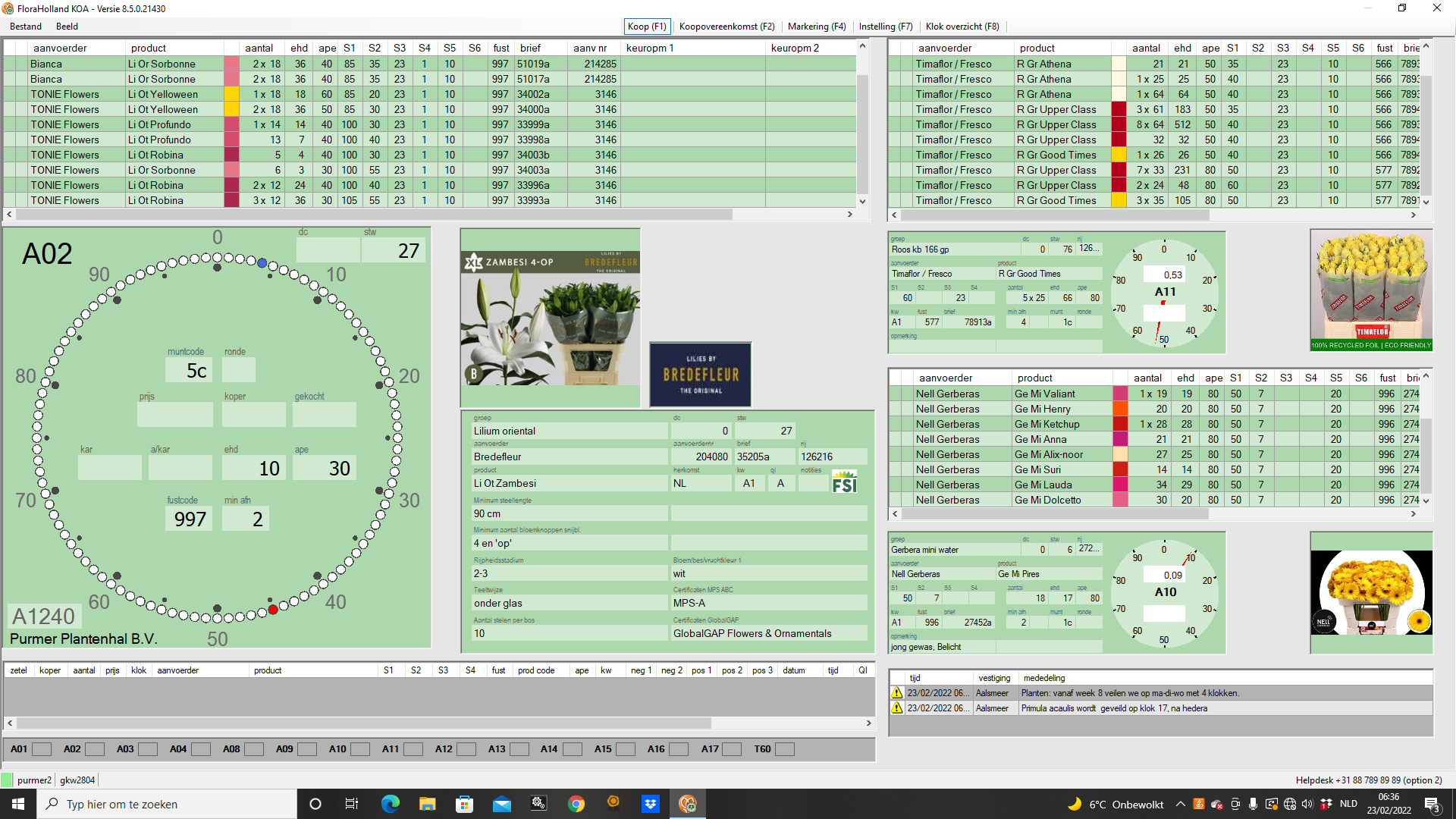
The auction usually starts around 06:00 in the morning.
When the clock starts running, the price begins at a high level and slowly decreases.
The buyer who presses their keyboard key first stops the clock and buys the lot.
Each key on your keyboard represents a certain quantity.
The moment you stop the clock:
- your buyer number appears in green
- the purchase is confirmed
- you receive the quantity assigned to that key (or the minimum amount if that is more)
Keyboard Quantities and Settings
Each keyboard key can represent a different purchase quantity.
You can view and adjust these settings by pressing F7.
For example:
- X = 2 containers
- Q = 2 trolleys
This is extremely important to check before the auction starts.
A trolley may contain 50 to 100 containers, meaning one accidental key press could result in buying hundreds of stems more than intended.
Always verify your keyboard settings before the auction begins.
What Happens If You Buy More Than What Is Available?
If you try to buy more containers than are still available, you will automatically receive the remaining quantity.
Example:
You press a key set to buy 10 containers, but only 5 containers remain.
In this case you receive 5 containers and the lot is fully sold.
Multiple Auction Clocks
There are multiple auction clocks running simultaneously.
Each clock auctions different product groups at the same time.
Because of this, buyers must switch between clocks themselves.
You can switch between clocks using the number keys on your keyboard.
However, there are more clocks than numbers on the keyboard, so you must assign them first.
Viewing All Clocks (F8)
Press F8 to open the overview showing all available auction clocks.
Here you can see:
- which clocks are active
- which flower groups are currently being auctioned
- when you click on a clock, you see the total overview of the groups which will be auctioned on this clock and in which order.
This allows you to quickly decide which clocks you want to follow.
Assigning Clocks to Keyboard Numbers (F7)
After identifying the clocks you want to follow, you can assign them to keyboard numbers using F7.
Example:
1 → Clock C1
2 → Clock C2
3 → Clock C3
From that moment on you can switch between clocks instantly.
Viewing Upcoming Lots
On the main clock and the side clocks you selected, you can see upcoming lots.
The bottom lot in the list is the next lot to be auctioned.
Every time a lot is sold:
- the upcoming lots move down
- a new lot appears at the top
Depending on your layout you will see 4 to 12 upcoming lots.
This allows buyers to prepare before the lot reaches the clock.
Understanding Product Specifications
Each lot shows several specifications.
The most important ones are:
S1 – stem length (cutflowers) or plant height (potplants)
S2 – product specific characteristic
S3 – product specific characteristic (mostly ripeness)
The meaning of S2 depends on the product.
Example cuflowers:
Germini → flower diameter
Lisianthus → number of flowers per stem
Example potplants:
Rhododendron → plant diameter
Zamioculcas → number of branches per plant
Understanding Ripeness (S3)
Ripeness is one of the most important factors when buying flowers.
The ripeness scale goes from 1 to 5.
1 = very tight
5 = very open
Example:
Roses (cutflowers) are usually sold as 2-3.
This means some stems are stage 2 and some stage 3.
This is generally ideal for resale because the flowers still have a good vase life.
However, sometimes you will see:
3-4
4-4
4-5
These flowers or plants are already quite open (blooming).
They may still be good flowers, but their vase life or durability will be shorter.
Sometimes this can be beneficial.
For example, if you need flowers for an event or wedding the next day, open flowers can actually be perfect.
Because many buyers prefer tighter flowers, the open flowers lots are often cheaper.
This differs per flower, for example: Hydrangeas (cutflowers)
Hydrangeas must be ripe to look good.
For this reason they are often auctioned with ripeness levels like:
4-4
4-5
5-5
Tip: How to Discover the Normal Ripeness for a Product
Press F2 to open the marking screen.
Here you can see all products that will be auctioned that day.
Use the search bar to find the product.
Some products are abbreviated.
Example:
Hydrangea appears as Hydr M + variety name.
By looking at multiple lots you can quickly see what ripeness level is normal.
Marking Products to Follow
In the F2 screen you can mark products.
Double-click a lot or press Enter.
The row becomes blue.
When the product approaches the clock:
- the lot becomes orange
- you hear a notification sound
This ensures you never miss important products.
Creating Filters
You can also create filters in the marking screen.
Examples:
Hydrangea filter
Rose filter
Specific grower filter
Filters can be based on:
- product group
- grower
- stem length
- auction clock
This allows buyers to work much faster.
Tip: make a filter per auctiongroup you want to follow. It will make it easier to overview without seeing too many lots at once.
What To Do If You Make a Buying Mistake
If you accidentally stop the clock, you must act immediately.
Stop the clock again at a very high price.
This signals the auctioneer that something is wrong.
When the auctioneer speaks to you through your headset, simply say:
“Mistake.”
Do not give long explanations.
Auctioneers work very fast and do not like interruptions.
They may cancel the purchase, but they are not obligated to do so.
When a Purchase Cannot Be Cancelled
If another buyer already purchased the lot after you, the auctioneer can no longer cancel your purchase.
The only option then is to re-auction the product.
Re-auction handling fee: €85
You are also responsible for any price difference.
Returning Products That Do Not Match the Specifications
If the product does not match the specifications, you may file a complaint.
Examples:
- sold as 60cm but actually 40cm
- sold as A2 but actually B1
A quality inspector will inspect the product.
If the inspector agrees, the lot will be taken back.
If not, the lot remains your responsibility.
Quality Grades: A1, A2 and B1
Most flowers are sold as A1 quality.
However you may also see A2 or B1 lots.
These are clearly marked on the auction clock.
They are usually auctioned towards the end of the auction.
What A2 Means
A2 means there is one issue with the product, but only to a limited extent.
Examples:
- a few curved stems
- a few leafless stems
- a few damaged flowers
The important word is “a few”.
Sometimes the difference between A1 and A2 is barely noticeable.
When A2 Can Be Interesting
Many buyers avoid A2 lots.
Because of this, the price often drops significantly compared to similar A1 lots.
For experienced buyers this can create good buying opportunities.
Example:
If you remove leaves anyway, a few leafless stems may not matter.
However you should always evaluate the product carefully.
A2 Tip
Never buy white flowers with “a few brown flowers.”
Brown flowers are extremely visible on white varieties and can make the product difficult to sell.
What B1 Means
B1 means the issue is not limited anymore.
Example:
If the issue is curved stems, in B1 most stems are curved.
These products are usually only interesting for very specific uses or very low prices.